

If you run IT for dozens of clients, an expired certificate is not a client's problem. It is your incident. The browser warning appears on their website, the VPN stops accepting connections, the API calls start failing, and the first person to notice is usually the client.
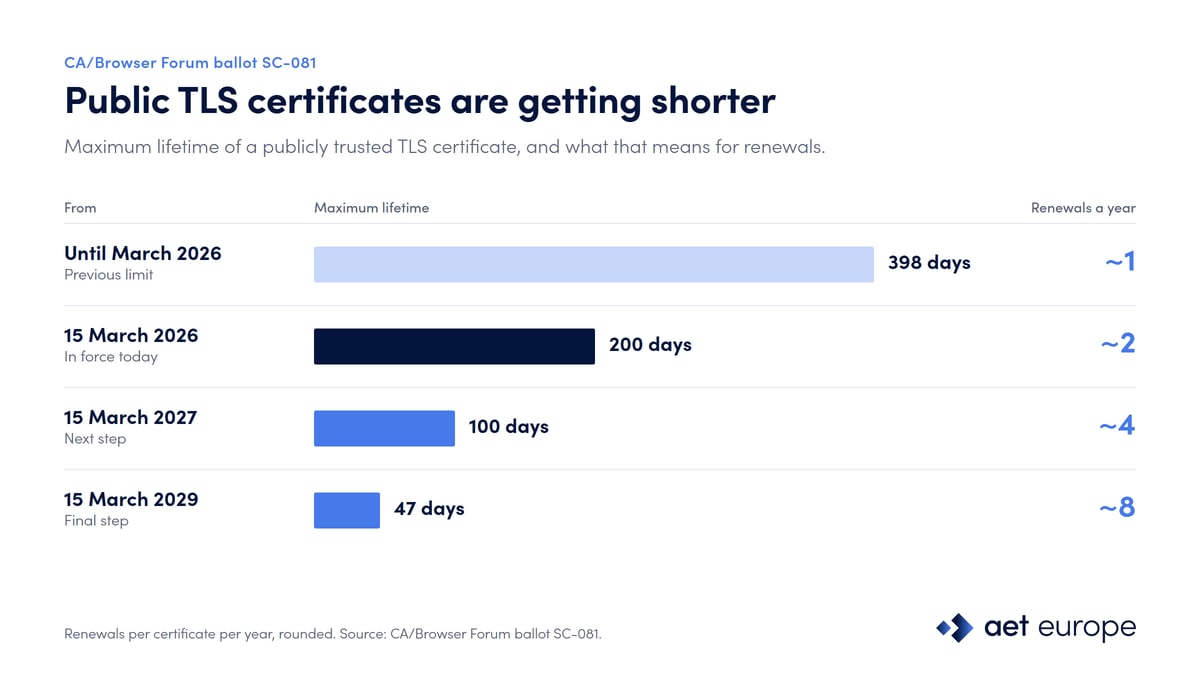
That was manageable when public TLS certificates lasted a year. It is not any more. Since 15 March 2026 the maximum lifetime of a public TLS certificate is 200 days. It drops to 100 days in March 2027 and to 47 days in March 2029, under CA/Browser Forum ballot SC-081. Let's Encrypt is shortening its own default from 90 to 45 days by 2028, and it stopped sending expiry reminder emails in June 2025.
This guide is for managed service providers who need to know, every day, which client SSL certificates (technically TLS certificates today) are about to cause trouble. It covers how to build a multi-client inventory, what to check, how to set alert thresholds that still make sense with short-lived certificates, and how to turn monitoring into a service your clients can see.
Throughout, we use anonymised figures from three Certificate Transparency scans AET Europe ran in November 2026: a mid-sized European MSP, a national telecom provider and a large European research organisation. Names, hostnames and networks are left out; figures are rounded.
Why SSL monitoring is now an MSP problem
Three things have changed at the same time.
- More renewals. Shorter lifetimes mean more renewal events per certificate. Compared with annual certificates, 47-day certificates mean roughly eight times as many renewals a year.
- Less room for error. With a 47-day certificate, a 30-day warning fires on day 17, before the certificate is even three weeks old. Alerting rules built for annual certificates turn into constant noise.
- Fewer safety nets. Let's Encrypt ended its expiry notification emails on 4 June 2025. Many teams relied on those emails without realising it.
How much the workload grows depends on where an estate starts. Estates that already run mostly on 90-day Let's Encrypt certificates see a smaller increase than estates with many long-lived certificates. In our three scans:
| Estate | Renewals a year today | Renewals a year at 47 days |
|---|---|---|
| Mid-sized MSP | ~730 | ~1,590 |
| National telecom provider | ~6,400 | ~12,600 |
| Large research organisation | ~22,000 | ~87,000 |
Estimated from the public certificates in each estate, November 2026.
For an MSP, these effects multiply across every client, every hosting provider and every DNS setup you inherited.
Auto-renewal is not monitoring
Most public certificates today renew automatically through ACME. That is good, and it is not enough. Automated renewal fails silently in ways that only show up when the old certificate expires:
- The client changed DNS. They moved their nameservers, switched on a CDN proxy or pointed a record somewhere else. The ACME challenge can no longer reach your server, and the next renewal fails while the current certificate still looks fine.
- The certificate renewed but was never deployed. The new certificate sits on disk, but the web server, load balancer or appliance is still serving the old one from memory because no reload hook ran.
- The edge serves a different certificate. A CDN or reverse proxy presents its own certificate to visitors. Your origin check says green; visitors see an error.
- Rate limits and validation errors. A renewal loop that keeps failing can run into the certificate authority's limits and stay blocked when you need it most.
Monitoring is the independent check that tells you whether automation actually worked, from the point of view of the people using the service.
Step 1: Build a multi-client certificate inventory
You cannot monitor what you do not know exists. Most MSPs track the main domains they host and miss everything around them.
What belongs in the inventory
- Apex domains and their
wwwvariants - Subdomains: portals, shops, APIs, customer and partner logins
- Staging, test and development environments
- Hostnames that only redirect (they still need a valid certificate before the redirect fires)
- Domains the client registered and pointed at your infrastructure without telling you
- Everything that is not a website: SSL VPN gateways, firewalls, mail servers (SMTP, IMAP), remote desktop gateways, appliances and services on ports other than 443
- Certificates from internal or private CAs, which need their own tracking because they never appear in public logs
The non-web part is where most guides stop and where MSPs get caught out. In our scans, the public logs alone showed hundreds of hostnames that look like test systems, remote access, mail or administration interfaces: around 230 test hostnames at the telecom provider, around 790 remote-access and 320 mail hostnames at the research organisation. Each of these carries a certificate someone has to renew.
Use Certificate Transparency to find what is missing
Every publicly trusted TLS certificate is recorded in public Certificate Transparency (CT) logs. Searching those logs for a client's domains shows every public certificate issued for them, including ones nobody on your side requested or remembers. It is the fastest way to audit an estate you just inherited when onboarding a new client.
The results are usually larger and messier than the client's own list. At the MSP we scanned, roughly half of the 240 hostnames in the logs appear only in the certificate history and no longer carry a current certificate: decommissioned services, renamed systems or names someone forgot. Each one is a question to settle: still in use, or safe to drop?
Want to see this for your own clients? Our free Certificate Transparency Scan lists every public certificate for a domain or group of domains. Request your scan →
CT logs only cover public certificates. For internal CAs, appliances that are not publicly reachable and cloud certificate stores, combine the CT view with network scans and the certificate inventories of the platforms themselves.
Fields to record per certificate
| Field | Why it matters |
|---|---|
| Client | Grouping, reporting and escalation |
| Hostname(s) and port | What you actually check |
| Issuing CA | Determines the renewal mechanism and what breaks if that CA has a problem |
| Renewal method | ACME, managed hosting, CDN, manual, internal CA |
| Who controls DNS | You, the client or a third party: decides who can fix a failed validation |
| Technical owner (MSP side) | A team or role, not a person |
| Client contact | Who acts when the fix is on the client's side |
Step 2: Check what clients actually see
The only check that counts is the one made from outside, the same way a browser, mail client or VPN client connects. It needs no credentials and no agent: the server presents its certificate during the TLS handshake. Check daily, and check more than the expiry date:
- Expiry date of the certificate actually served
- Hostname match: does the certificate cover the name being requested (SAN)?
- Full chain: is the server sending the intermediate certificates, and are they still valid? Browsers often hide a missing intermediate; API clients, mobile apps and
curldo not. - Which certificate is served: is it the newest one issued for that name, or an older one still loaded somewhere?
- CAA records: do the client's DNS records still allow the CA you use?
The served-certificate check matters more than most teams expect. In our scans, some hostnames that answered on HTTPS returned a different certificate from the latest one the CT logs show for that name. At the MSP this was about 6% of answering hostnames; at the research organisation about 15%; at the telecom provider about 44%. Some of these are expected, such as a CDN certificate covering many names. Others are older certificates still loaded after a renewal, or a default certificate on the wrong virtual host. You only know which by looking from the outside.
Track domain registration expiry alongside certificates. A lapsed certificate causes a warning; a lapsed domain can be lost.
Step 3: Set alert thresholds for short-lived certificates
A single "expires in less than 30 days" rule fails in two ways. With annual certificates it gives too little structure; with 47-day certificates it fires almost all the time. Use a ladder instead, and tie each step to a different action and channel.
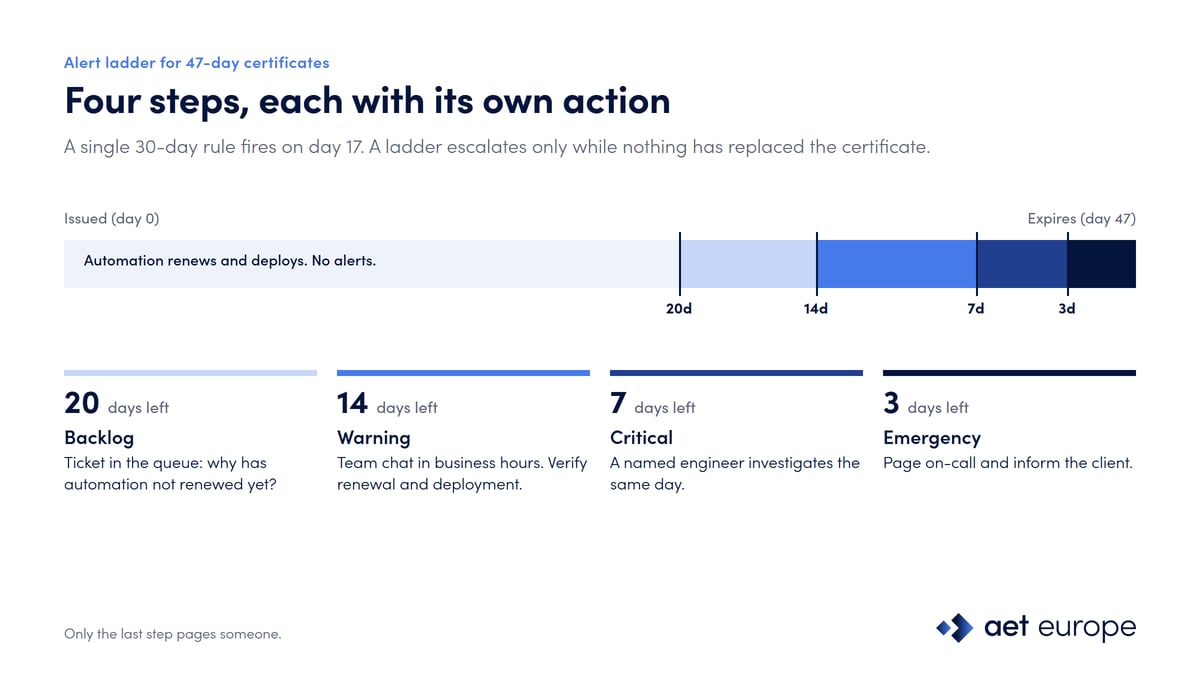
The same ladder, with thresholds for both longer and shorter certificates:
| Step | Certificates of 200 days or more | Certificates of 47 to 100 days | Action |
|---|---|---|---|
| Backlog | 30 days | 20 days | Ticket in the queue: why has automation not renewed yet? |
| Warning | 14 days | 14 days | Team chat during business hours; verify renewal and deployment |
| Critical | 7 days | 7 days | Named engineer investigates the same day |
| Emergency | 1 day | 3 days | Page on-call; inform the client |
Only alert on certificates that have not been replaced
This is the rule that cuts most of the noise. With frequent renewals, many certificates close to expiry already have a successor in place; they will simply expire unused. An alert on the old certificate is not a problem to solve.
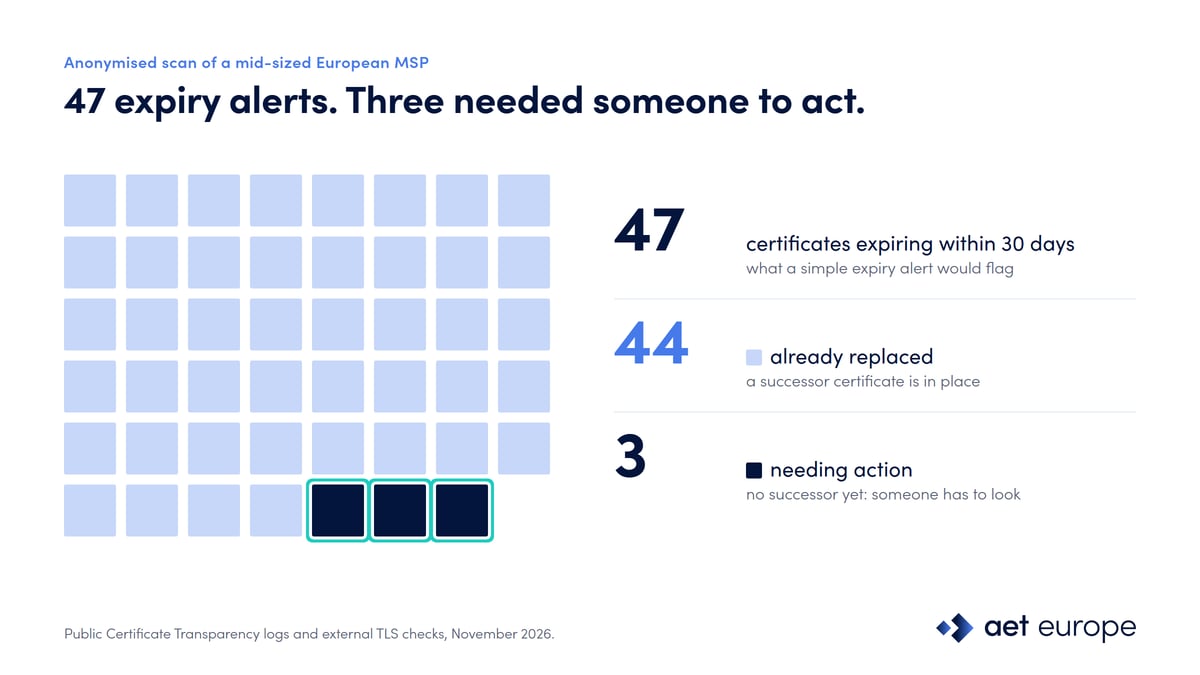
The larger estates show the same pattern, at a different scale:
| Estate | Certificates expiring within 30 days | Already replaced | Needing action |
|---|---|---|---|
| Mid-sized MSP | 47 | 44 | 3 |
| National telecom provider | ~520 | ~410 | ~110 |
| Large research organisation | ~1,270 | ~570 | ~700 |
Public Certificate Transparency logs and external TLS checks, November 2026.
Monitoring that knows whether a successor certificate exists, and whether it is actually being served, is what makes alerting usable at scale.
Keep alerts with different causes separate. A DNS change by the client, a failed ACME challenge, a broken chain and a hostname mismatch each have a different fix and often a different owner.
Step 4: Make ownership and escalation explicit
Most certificate outages are not technical surprises. The certificate was known; nobody felt responsible for it. In an MSP setting this gets worse, because responsibility is split between you, the client and often a third party such as a web agency or software vendor.
- Assign every certificate to a team or role, not a person. People change jobs, and so do client contacts.
- Separate MSP actions from client actions. Reloading a web server is yours. Changing DNS at the client's registrar, approving an organisation validation or paying a registrar invoice is theirs. Your alert routing should know the difference and send each to the right queue.
- Check ownership when something changes. When a client switches web agency, moves hosting or replaces their IT contact, review which certificates are affected and who now owns them.
- Watch for concentration risk. At the MSP we scanned, about 81% of valid certificates came from a single CA. Automation against one CA is efficient, but if that renewal path breaks, most of the estate is affected at once. Know which clients depend on which renewal path.
Step 5: Turn monitoring into a service clients can see
Good monitoring prevents incidents, which means that when it works, nobody notices. Make it visible.
- Monthly or quarterly certificate report per client: how many certificates, what renewed, what is coming up, and what needs the client's action.
- Evidence for audits: clients under NIS2 or sector rules increasingly need to show they manage their certificates. A dated inventory and renewal history is exactly that evidence.
- A clear scope in the contract: which certificates you monitor, which you renew, which the client renews, and what happens when a fix sits on the client's side.
- Onboarding and offboarding runbooks: a CT scan and inventory when a client joins; a handover list when a client leaves.
Scripts, monitoring tools or a CLM platform?
Which approach fits depends on the size of the estate and how much control and reporting your clients need.
| Approach | Works for | Where it breaks |
|---|---|---|
| Spreadsheet and manual checks | A handful of certificates | Out of date within weeks; no alerts |
| Scripts and cron jobs | Technical teams with a few dozen hostnames | Checks from your own network, misses CDN and edge issues, no history, no ownership |
| External monitoring tool | Many client websites | Usually web-only; limited ownership, reporting and renewal control |
| Certificate lifecycle management (CLM) | Larger or regulated estates, several CAs, governance needs | More than you need for a few simple websites |
Many MSPs end up with a combination: external monitoring for breadth, and lifecycle management where clients need ownership, governance and reporting.
Checklist: SSL monitoring for MSPs
Inventory
- Every client has a certificate inventory, including subdomains, test systems and non-web services.
- Inventories are checked against Certificate Transparency logs at onboarding and periodically after.
- Certificates from internal CAs and on non-public appliances are tracked separately.
Checks
- Every certificate is checked daily from outside your own network.
- Checks cover expiry, hostname match, full chain and which certificate is actually served.
- Domain registration expiry is monitored alongside certificates.
- Renewal deployment is verified, not assumed.
Alerts
- Alert thresholds match certificate lifetimes and use a ladder, not a single threshold.
- Alerts ignore certificates that already have a successor in service.
- Alerts with different causes are routed separately.
Ownership and reporting
- Each certificate has an owning team on your side and a contact on the client side.
- Clients receive a regular certificate report.
Frequently asked questions
How do I monitor SSL certificate expiry for many client domains?
Build an inventory per client, verify it against Certificate Transparency logs, and check every hostname daily from outside your network. Alert on a ladder of thresholds, only for certificates that have not been replaced, and route each alert to the team or client contact who can act.
Is uptime monitoring enough to catch SSL expiry?
No. Uptime checks tell you whether a site responds. They usually do not tell you how long the served certificate has left, whether the chain is complete, or whether the certificate is the one you think it is.
What alert thresholds should I use for 47-day certificates?
A practical ladder is 20, 14, 7 and 3 days before expiry, with only the last step paging someone. A 30-day threshold on a 47-day certificate fires on day 17 and creates noise.
Does Let's Encrypt still send expiry emails?
No. Let's Encrypt stopped sending expiry notification emails on 4 June 2025. You need your own monitoring.
How do I find certificates I don't know about?
Search Certificate Transparency logs for each client domain. They list every publicly trusted certificate issued for it. For internal and private-CA certificates, add network scans and the certificate stores of your cloud and hosting platforms.
Do the shorter lifetimes apply to private CA certificates?
No. The CA/Browser Forum limits apply to publicly trusted TLS certificates. Internal CAs set their own lifetimes, but those certificates still need to be inventoried and monitored.
Start with a clear picture
Monitoring and automation can only cover the certificates you know about. AET Europe's free Certificate Transparency Scan gives you that picture for a domain or a group of domains: every public certificate, what expires in the next 30 days, what changes at 47 days and who has to act. It is built from public records only, so there is nothing to install and no access to your systems.
Request your Certificate Transparency Scan
Want to see where certificate lifecycle management is heading? Have a look at what we are building with BlueX Online, or read more about certificate lifecycle management and what shorter TLS lifetimes mean for your team.
About the scan figures: counts come from public Certificate Transparency logs and external TLS checks made in November 2026. They are minimums, not totals: they do not include certificates from private CAs or systems that are not publicly reachable.